
The photo keychain
A little photo. A whole world.
Your favourite photo on a keychain. Tap it with your phone and it opens your own world of photos — no app needed.
- No app to download
- Add photos anytime
- Made to order

The magic part
Tap it. Your world opens.
It looks like a photo keychain. Hold it to your phone and it opens every photo, trip and memory you’ve kept together.

Placeholder“Tap to open your world” — explainer videoVertical 4:5 loop, 6–12 s, no sound needed
Hold it to your phone
A tiny chip sits inside the keychain. No battery, nothing to charge, nothing to pair.
Your world opens instantly
Right in the phone’s browser. No app to download, for you or for anyone you show it to.
Every memory, beautifully kept
Trips, birthdays and everyday moments, each as its own collection in the colours of its photos.
Works with iPhone XS and newer and most Android phones with NFC.
Your world
Everything you’ve done together, in one place.
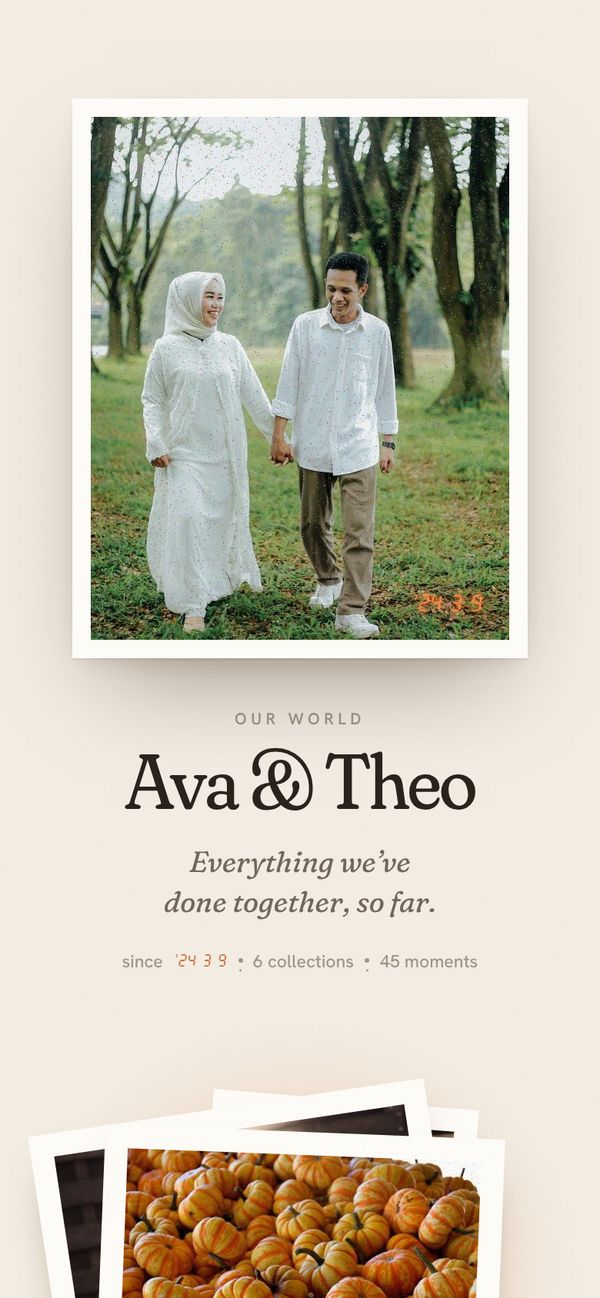
Not a camera roll. Each trip, celebration and everyday moment becomes its own collection, laid out like prints on a table.


Real Glimit screens, shown with sample photos.
Not just a photo keychain
One photo on the outside. All of them inside.
A photo keychain
- Shows one photo
- Never changes
- Photos stay on your phone
- One of one
Glimit
- Opens a whole world of photos with a tap
- Add new photos and collections anytime
- Trips and moments organised into collections
- Together Set: two keychains open the same world
Choose yours
One for you, or one each.
Both are made to order with your photo.
How it works
Simple to order. Magic to open.
No account at checkout, nothing to set up in advance.
PlaceholderStep 1 — choosing a photo on a phoneLandscape, about 4:3
Choose your photo
Upload your favourite photo as you order. It becomes a warm, retro print.
PlaceholderStep 2 — the keychain arrivingLandscape, about 4:3
Receive your Glimit
Your photo, sealed in a clear keychain with a tiny chip inside — made to order.
PlaceholderStep 3 — tapping it with a phoneLandscape, about 4:3
Tap to create your world
The first tap opens a new world. Name it, save it, and start adding photos.
PlaceholderPackaging / gifting4:5 — the gift box, keychain and “Tap to begin” card
Giving one
Most gifts are finished when they’re opened. This one begins.
Their favourite photo on the outside — and a world inside that they set up with one tap and keep filling for years.
- Anniversaries
- Valentine’s Day
- Long distance
- Best friends
- New parents
- Grandparents
- Birthdays
Giving it as a gift? Don’t tap it first — the first person to save the world becomes its owner.
Questions
Good to know
Do I need an app?
No. Hold the keychain near the top of a phone with NFC and your world opens in the browser. It works with iPhone XS and newer and most Android phones with NFC switched on.
What happens on the first tap?
Your photo appears on screen, you give your world a name, and you save it with an email and password. That’s the whole setup — from then on, every tap opens your world.
How does the Together Set work?
Both keychains open the same world, so there’s nothing to keep in sync. Whoever saves the world first becomes its owner.
Who can see our world?
Anyone holding your keychain can look, the way anyone can look at a photo in your wallet. Your world isn’t listed or searchable anywhere, and changes need the owner’s login.
Which photo works best?
A clear, well-lit photo where faces are fairly close. It’s printed in a 4:5 shape, so leave a little room around the edges. You can add a note about the photo when you order.
Can I give it as a gift?
Yes — just don’t tap it before you give it. The first person to save the world becomes its owner.
When will it arrive?
Every Glimit is made to order. Delivery options and times are shown at checkout.

Keep your world on your keys.
Your favourite photo on the outside. Everything else, one tap away.